
Updated September 22, 2026 · AIXYZ Microsoft Copilot Learning Series · Article #2
Microsoft Copilot can help you draft emails, research topics, prepare presentations, understand documents, and organize everyday work. But when you explore Microsoft’s products, you may encounter several similar names: Microsoft Copilot, Microsoft 365 Copilot Chat, Microsoft 365 Copilot, and Copilot Business. Are they the same assistant? Which one can access company information? Do you need a paid subscription?
The most important difference is what information Copilot can access, where it works, and which features your account is licensed to use. This guide explains the main experiences, compares their capabilities, and shows how to check what you already have before purchasing anything.
New to Copilot? Start with Article #1: What Is Microsoft Copilot? A Complete Beginner’s Guide to Getting Started in 2026. Check that this URL matches your published Article #1 permalink.
1. Microsoft Copilot is a family of AI experiences
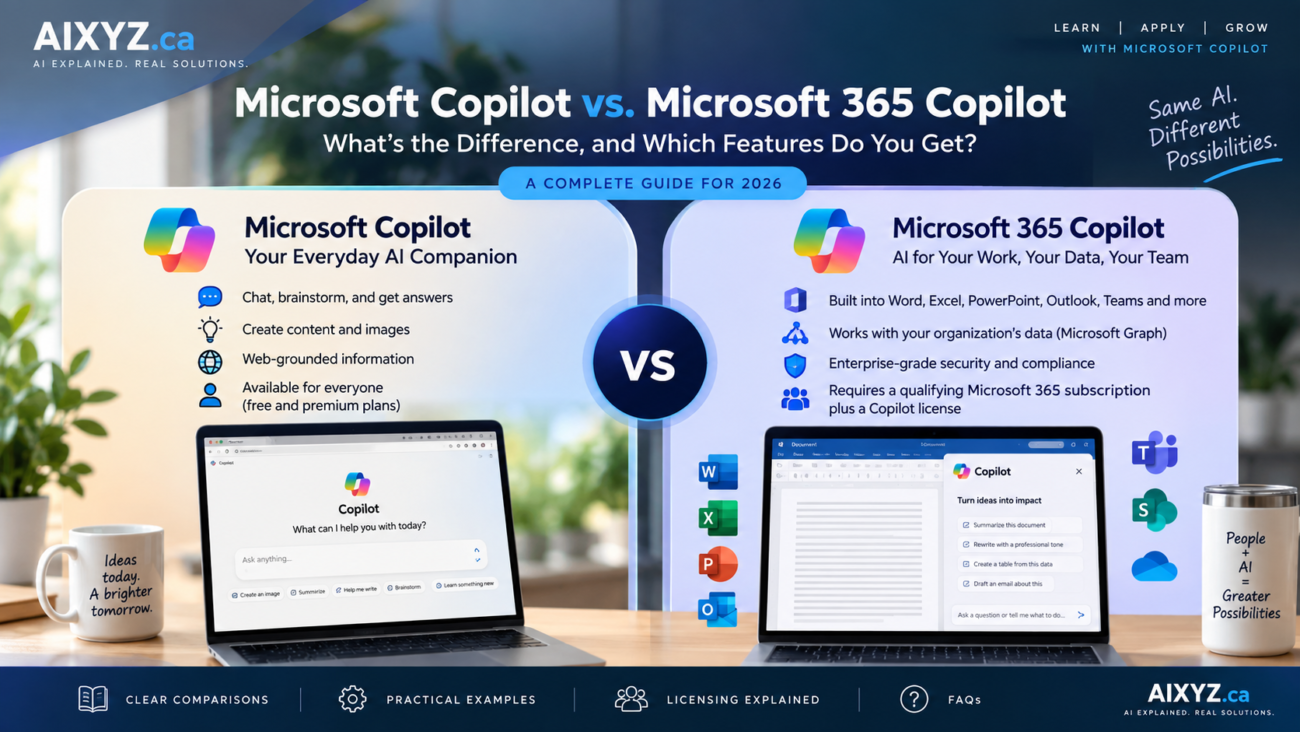
Microsoft uses the Copilot name for multiple products, not one universal subscription that unlocks everything. For most beginners, four experiences matter:
- Microsoft Copilot (personal): An assistant for everyday questions, writing, learning, and brainstorming, with free access and optional paid consumer plans.
- Copilot in personal Microsoft 365 subscriptions: Supported AI capabilities in applications such as Word, Excel, PowerPoint, and Outlook, depending on the consumer plan and usage limits.
- Microsoft 365 Copilot Chat (work or school): An AI chat experience available with eligible organizational Microsoft 365 subscriptions, with enterprise data protection.
- Licensed Microsoft 365 Copilot (work): Additional organizational features, including supported work-grounded chat and deeper Microsoft 365 integration, subject to licensing, permissions, and configuration.
In other words, personal Copilot, included work chat, and licensed work Copilot are not interchangeable.
2. Microsoft Copilot for personal use
Start at copilot.com. You can ask everyday questions, draft content, brainstorm ideas, practice a skill, and work with information you choose to provide. A personal Copilot account does not automatically give the assistant access to your company’s SharePoint sites, private Teams meetings, or business mailbox.
Practical example: draft an email
Write a friendly, professional follow-up email to a customer who received my proposal last week. Ask if they have questions and whether they would like to schedule a brief call. Keep it under 120 words.
Copilot can generate a draft. You then check it and send it through your own email application. Drafting an email in chat is different from being authorized to send an email on your behalf.
Good starting point: If your main tasks are learning, writing, research, or brainstorming, try the free personal experience before buying a subscription.
3. Copilot in Microsoft 365 Personal, Family, and other consumer plans
Personal Microsoft 365 subscriptions can include Copilot features inside supported productivity applications, along with traditional Microsoft 365 benefits. The exact plans, feature allowances, and regional pricing may change; use Microsoft’s current Canadian consumer plan comparison before buying.
- Personal: Designed for one subscriber using Microsoft 365 applications and included AI capabilities.
- Family: Shares eligible Microsoft 365 family benefits, but premium AI entitlements are generally associated with the subscription owner rather than automatically granted to every family member.
- Higher consumer tiers, where offered: May provide additional AI capabilities or usage allowances. Check the product page for the exact plan currently available in your country.
Important: A paid personal Microsoft 365 subscription does not automatically become an enterprise Copilot license. It does not, by itself, provide organizational Microsoft Graph access or your employer’s administrative and compliance controls.
Practical example: prepare a report in Word
With an eligible plan and supported Word application, you may be able to draft or refine a report directly in Word. If the report must incorporate information from your employer’s authorized SharePoint files, emails, and meetings, that is a different work-data use case and may require organizational licensing and configuration.
4. Microsoft 365 Copilot Chat: the included work chat experience
Microsoft 365 Copilot Chat is available to users with eligible work or school Microsoft 365 subscriptions. Its included experience supports web-grounded chat and provides enterprise data protection. Users can work with content supplied to the chat through supported features.
It is essential to distinguish working with a file you provide from searching across organizational data that Copilot independently retrieves for you.
| Request | What it requires |
|---|---|
| “Summarize the document I attached.” | An experience that supports the supplied file and its format. |
| “Find the latest approved proposal in SharePoint and compare it with last month’s version.” | Appropriate work-grounded capabilities, accessible content, user permissions, and configuration. |
The underlying Microsoft 365 subscription is not free. Also, some agent features, enhanced integrations, or usage may involve additional licenses or consumption charges. Consult Microsoft’s Copilot Chat FAQ for the current boundaries of the included experience.
5. Licensed Microsoft 365 Copilot: AI grounded in your work
Licensed Microsoft 365 Copilot can support richer work-grounded assistance across supported Microsoft 365 applications and organizational information. It uses relevant work context through Microsoft Graph according to the signed-in user’s existing permissions and the organization’s settings.
Practical example: prepare for a status meeting
Help me prepare for my upcoming project status meeting. Using project information I am authorized to access, summarize the latest updates, outstanding action items, upcoming deadlines, and unresolved decisions. Cite the underlying sources and identify anything you could not verify.
This is a different request from asking a standalone chatbot to generate a generic meeting agenda. Actual results depend on supported integrations, your assigned license, accessible content, and meeting or application configuration.
Where can the organizational Copilot experience help?
- Word: Draft, summarize, and refine supported documents.
- Excel: Assist with supported formula, analysis, and visualization tasks.
- PowerPoint: Help create and edit presentations using supported features and source material.
- Outlook: Support supported email and calendar workflows.
- Teams: Assist with meeting and conversation-related tasks where applicable prerequisites are met.
Seeing a Copilot button in an application does not prove that every advertised Copilot feature is included in your license.
6. Side-by-side feature comparison
The table below compares the free personal chat, included organizational Copilot Chat, and licensed organizational Microsoft 365 Copilot. Paid consumer plans are discussed separately above.
| Capability | Personal Copilot (free) | Included work Copilot Chat | Licensed Microsoft 365 Copilot |
|---|---|---|---|
| Everyday AI writing and questions | Yes | Yes | Yes |
| Account | Personal account | Eligible work/school account | Eligible work/school account and license |
| Enterprise data protection | Not the same enterprise terms | Yes, for eligible work experience | Yes |
| Work with explicitly provided content | Supported formats/features | Supported formats/features | Supported formats/features |
| Broad work-grounded organizational chat | No automatic access | Not part of base web-grounded chat | Supported, within permissions and configuration |
| Integrated organizational app features | Not the licensed work experience | Selected included experiences only | Broader supported capabilities |
| Additional Copilot license | No | Not for included base chat | Generally required |
For exact entitlements, use Microsoft’s current organizational licensing documentation and Copilot Chat FAQ.
7. How much does Copilot cost?
Pricing changes with country, billing term, promotions, and eligibility. Instead of relying on an old copied price, use the official regional price displayed when you purchase. For Canadian readers, these are the key pages:
- Microsoft Copilot and Microsoft 365 plans for individuals (Canada)
- Microsoft 365 Copilot plans for business (Canada)
| What you want | What to check before paying |
|---|---|
| Personal AI chat | Try the free personal Copilot experience first. |
| AI in personal Word, Excel, or PowerPoint | Eligible personal Microsoft 365 plan, app support, and AI usage limits. |
| Basic AI chat at work | Whether your existing work/school Microsoft 365 subscription already includes Copilot Chat. |
| Work-grounded Copilot across organizational applications | Underlying eligible subscription, required Copilot add-on or bundle, and administrator setup. |
| Custom business agents | Agent-specific licensing, included allowances, and any metered consumption charges. |
Example: A ten-person team may not need ten identical paid Copilot add-ons. If only three employees need work-grounded organizational features, compare the cost of licensing those three with the capabilities already included for the rest. Confirm Microsoft licensing requirements before placing an order.
8. How to check which Copilot license you already have
For a personal account
- Visit account.microsoft.com/services.
- Sign in and check your current Microsoft 365 subscriptions.
- Open Copilot with the same account.
- Compare the feature you want against the current consumer plan page and the supported application’s requirements.
For a work or school account
- Sign in to Microsoft 365 with your organizational account.
- Open the Copilot experience available to you.
- If a feature is missing, ask your Microsoft 365 administrator to check your assigned license, eligible underlying plan, app version, organizational policies, and feature rollout status.
A missing button is not always a licensing problem. It may also reflect application support, device, geography, organizational policy, or a feature that has not yet rolled out to your account.
9. What about Copilot Studio and agents?
Copilot Studio is Microsoft’s platform for creating and managing specialized agents and supported business workflows. For example, an organization might develop an agent that answers common HR questions using approved knowledge sources or guides employees through an IT support process.
That is different from opening a general chat window. Custom agents may require distinct setup, permissions, licensing, or consumption-based charges. You do not need Copilot Studio simply to begin using everyday Copilot chat.
10. Security: personal Copilot and work Copilot are not equivalent
Business information should be entered only into your organization’s approved AI environment. Eligible organizational Copilot experiences provide enterprise data protection; Microsoft says prompts and responses covered by those terms are not used to train foundation models. Consumer products have different terms and controls. Review Microsoft’s official Copilot Chat FAQ and your organization’s policy.
Organizational Copilot works within permissions, but that is not a reason to ignore access governance. If a sensitive SharePoint file is shared too broadly, AI-supported discovery may make it easier for users who already have access to find it. Review permissions, sharing settings, retention, classification, and other required controls before a broad deployment.
Regardless of the product, check important dates, calculations, citations, and business decisions against original sources. AI-generated content can be incomplete or wrong.
11. Frequently asked questions
Is Microsoft Copilot the same as Microsoft 365 Copilot?
No. The name spans personal AI products and work-focused offerings. Licensed organizational Microsoft 365 Copilot provides additional supported work-data and application capabilities.
Can I use Copilot for free?
Yes. There is a free personal Copilot experience. The included work Copilot Chat experience is also available to users with eligible underlying Microsoft 365 subscriptions.
Does Microsoft 365 Personal include Copilot?
Eligible consumer Microsoft 365 plans provide supported Copilot features and usage allowances. Check the current plan’s feature list; this is not the same as the full organizational Copilot license.
Does Microsoft 365 Family give every family member the same AI benefits?
Do not assume so. Premium AI benefits are generally assigned to the subscription owner. Confirm the current sharing conditions for your plan.
Can the free personal Copilot read my company’s Outlook messages?
It does not automatically have unrestricted access to your organization’s mailbox. Work access depends on supported features, authorized integrations, licensing, and permissions.
Can Copilot Chat summarize an attached document?
Supported file-based tasks may be available. Providing a specific file is different from authorizing Copilot to search broadly across your organization’s document repositories.
Does every employee need a paid Microsoft 365 Copilot add-on?
No universal answer applies. Assess tasks by user group. Some employees may need only the included chat experience, while others require supported work-grounded and app-integrated capabilities.
Does Microsoft 365 Copilot see documents I cannot access?
Its organizational access is intended to respect the signed-in user’s permissions. Administrators should still review existing access and sharing settings.
Is Copilot Studio included?
Some agent capabilities may be available within supported Copilot experiences, but specific Studio features and usage can have different licensing or consumption terms. Check requirements for the agent you intend to deploy.
Why is a Copilot feature missing from my account?
Possible reasons include account type, licensing, application version, administrator settings, regional availability, and phased rollout. Check the official feature documentation before purchasing another plan.
12. Final takeaway: start with your task, not the product name
For everyday personal writing and learning, begin with personal Copilot. For AI inside personal Microsoft 365 apps, compare consumer plans. At work, first check whether your existing subscription includes Copilot Chat. If you need assistance grounded in your organization’s accessible files, meetings, and emails, evaluate the appropriate licensed Microsoft 365 Copilot experience.
Choose based on the task, the data the assistant must use, your licensing prerequisites, and your security requirements. You do not need every Copilot capability to start receiving practical value.
Continue the series: Article #1 — What Is Microsoft Copilot? A Beginner’s Guide. Next in the series: How to Write Better Microsoft Copilot Prompts: A Beginner’s Guide with Real Examples.
Official Microsoft sources
- Microsoft 365 Copilot licensing documentation
- Microsoft Copilot Chat FAQ and enterprise guidance
- Copilot and Microsoft 365 consumer plans — Canada
- Microsoft 365 Copilot business plans — Canada
- Microsoft Support — Copilot product and feature guidance
Editorial note: Product features, licensing, and prices change. Check Microsoft’s linked pages for the latest information before making a purchase.