
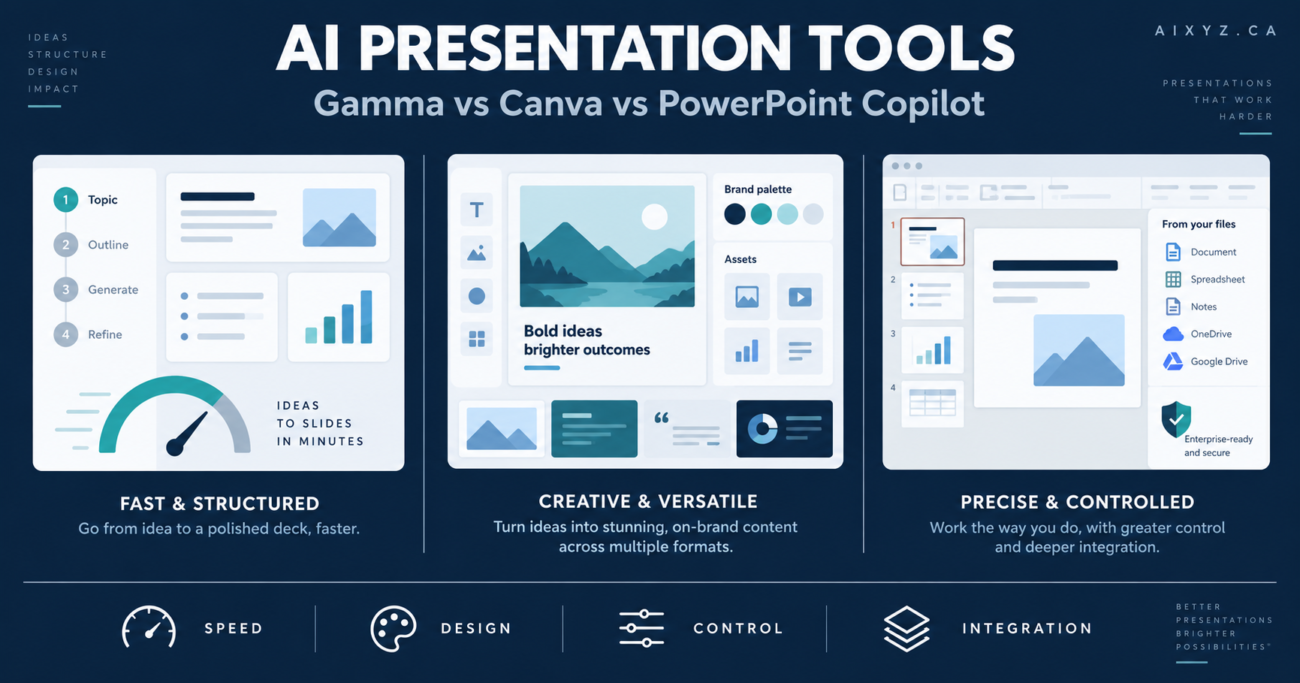
Gamma, Canva and Microsoft PowerPoint with Copilot can each turn an idea or source document into a presentation. That does not make them interchangeable.
Gamma is designed around fast, AI-first storytelling. Canva places presentation generation inside a much broader visual-content platform. PowerPoint Copilot adds AI to the format, templates and Microsoft 365 workflows many businesses already use.
The best choice therefore depends less on which tool produces the prettiest demo and more on what happens after generation: Who edits the deck? Must it follow an established template? Is the final PPTX the deliverable? Where is the source content stored? Will the presentation become social graphics or video?
This comparison uses official product information checked on September 8, 2026. Pricing and feature availability change frequently and may vary by region, billing term and account type.
Quick answer
- Choose Gamma for the fastest route from a brief to a modern, coherent, link-shareable presentation.
- Choose Canva when the presentation is one asset in a larger visual campaign and your team needs templates, brand assets, images, video and social formats in one place.
- Choose PowerPoint Copilot when editable PPTX files, corporate templates and Microsoft 365 integration matter more than novelty.
Overall editorial recommendation: Gamma is the best drafting specialist, Canva is the best visual-content platform, and PowerPoint Copilot is the safest operational choice for organizations already standardized on Microsoft 365.
Comparison at a glance
| Criterion | Gamma | Canva AI | PowerPoint Copilot |
|---|---|---|---|
| Best use | Rapid narrative-first decks | Branded visual campaigns | Enterprise and client PPTX workflows |
| AI starting point | Prompt, pasted text or imported file | Prompt, outline, template or attached document | Prompt, file or existing presentation |
| Editing model | Responsive cards | Freeform visual canvas | Traditional slides and master layouts |
| Strongest advantage | Speed and structure | Creative breadth and asset library | Precision, compatibility and Microsoft context |
| Main limitation | Exported PPTX may require cleanup | AI usage and premium assets depend on plan | Higher total licensing cost and more setup |
| Collaboration | Browser workspace and live links | Browser collaboration and brand workflows | Microsoft 365 sharing, comments and desktop/web apps |
| Best final format | Gamma link or PDF | Canva link, PDF, image or video | PPTX |
Best for—and not ideal for
Gamma
Best for: consultants, founders, project managers and small teams producing proposals, explainers, updates and workshop decks quickly.
Not ideal for: organizations that require exact PowerPoint masters, complex animations, offline editing or pixel-perfect PPTX handoffs.
Canva AI
Best for: marketing teams, creators and small businesses that need presentations plus social graphics, video, print and other branded assets.
Not ideal for: highly technical decks, complex financial models or teams that need PowerPoint-native governance and advanced slide mechanics.
PowerPoint Copilot
Best for: Microsoft 365 businesses, regulated organizations and teams whose presentation templates, files and collaboration already live in Microsoft’s ecosystem.
Not ideal for: occasional users who do not already pay for Microsoft 365, or creators seeking a single lightweight tool for many visual formats.
How the AI creation workflows differ
Gamma: AI is the starting environment
Gamma offers Generate, Paste and Import modes. Generate creates a draft from instructions; Paste formats approved text; Import restructures an existing file or webpage. Its card-based editor automatically manages much of the layout, so users can concentrate on sequence and message.
This produces a good first draft quickly. It also means Gamma has more influence over structure and appearance. For factual or client-sensitive material, Paste is usually the strongest professional workflow: approve the content first, then let Gamma design it.
Gamma can present directly, share a live link and export to PDF, PNG or PPTX. The vendor warns that exports reflect Present Mode rather than Edit Mode and that scaling or font substitution can create differences. Treat PPTX export as a handoff requiring inspection.
Canva: AI operates inside a visual production suite
Canva AI for Presentations starts with a description, outline or content. Users can edit the generated outline before producing the deck. Canva’s Edit with AI can also adapt a selected template or a private design, and users may attach a PDF or Word file for context.
Canva’s real advantage appears after the first draft. A team can draw from templates, stock media, generated images, charts, brand assets and other Canva formats. A presentation can become a social carousel, promotional graphic or video without rebuilding the campaign elsewhere.
That breadth can also distract. Canva makes it easy to decorate a weak argument. Business users should approve the narrative and data before exploring visual options. Canva states that AI presentation creation is a premium AI tool and counts toward monthly AI usage; access depends on the plan.
PowerPoint Copilot: AI works inside the established deliverable
Copilot can draft a presentation from a prompt or file, add slides, summarize a presentation and assist with edits. Microsoft’s file-based workflow can turn a Word document into a presentation with images and speaker notes. Newer Agent Mode capabilities can perform multi-step, PowerPoint-native actions, although some controls and file-reference features may still be rolling out by account.
PowerPoint remains the strongest option when the PPTX itself must be editable and compliant with an organizational template. Microsoft advises that representative sample slides help Copilot understand how the organization communicates visually; a template alone is not a guarantee of perfect branding.
The value rises when the source material already resides in Microsoft 365 and users have appropriate work licenses. If the team does not use Microsoft 365, buying the surrounding suite only for AI presentation creation is harder to justify.
Head-to-head evaluation
1. Speed to a usable first draft: Gamma wins
Gamma removes more layout decisions from the initial workflow. A concise brief can become a structured, visually consistent presentation with little manual setup. Canva is also fast, but users may spend more time choosing and adjusting visual styles. Copilot can create a strong draft, particularly from an organized Word file, but its traditional slide model invites more detailed editing.
Winner: Gamma
2. Visual flexibility and content repurposing: Canva wins
Canva has the broadest creative environment of the three. Presentations coexist with images, video, print designs, social content and a large template ecosystem. Gamma supports several formats, but Canva offers more hands-on visual control. PowerPoint is powerful for presentation-specific design but is not the same kind of multi-format content studio.
Winner: Canva
3. Corporate templates and exact PPTX editing: PowerPoint wins
PowerPoint is the native destination for many client and executive deliverables. It supports familiar slide masters, detailed object control, animation and offline work. Gamma and Canva can export PowerPoint files, but conversion adds a quality-assurance step and may reduce fidelity or editability.
Winner: PowerPoint Copilot
4. Link sharing and web-style presentation: Gamma wins
Gamma’s responsive cards and live sharing fit asynchronous reading better than conventional slides. This is useful for proposals and explainers intended to be consumed through a link. Canva also supports shared designs, while PowerPoint works best when recipients expect Microsoft files or Microsoft 365 links.
Winner: Gamma
5. Brand-system breadth: Canva wins for SMBs; PowerPoint wins for established enterprises
Canva makes brand assets reusable across many marketing formats and lets eligible administrators manage AI access. PowerPoint is stronger when an organization already has mature corporate templates and Microsoft governance. Gamma Pro adds custom branding and fonts, but its ecosystem is narrower.
Winner: Canva for cross-channel brands; PowerPoint for established presentation standards
6. Business ecosystem integration: PowerPoint wins
Microsoft 365 Copilot works across Word, Excel, Outlook, Teams and PowerPoint and can use work content according to the user’s permissions. That matters when decks are assembled from existing reports and documents. Gamma and Canva are easier standalone purchases, but they introduce another workspace and data-processing relationship.
Winner: PowerPoint Copilot
Pricing and plan considerations
Pricing was checked on September 8, 2026. All figures below are public US-dollar list prices or displayed starting prices; taxes, promotions, billing terms and Canadian pricing may differ.
| Tool | Entry point | Paid consideration |
|---|---|---|
| Gamma | Free plan with starter credits and up to 10 slides per prompt | Plus displayed from US$9 per seat/month; Pro adds custom branding, analytics, password protection and API access |
| Canva | Free plan with limited AI allowance | Paid plans increase AI allowances and unlock premium brand/content capabilities; confirm the current local price on Canva’s pricing page |
| PowerPoint Copilot | PowerPoint for the web has a free editing option, but full work Copilot requires eligible licensing | Microsoft displayed Copilot Business from US$18 per user/month paid yearly during the check; Business Standard with Copilot was US$23.50 per user/month paid yearly |
Do not compare only the headline subscription. A business should calculate:
- Existing licenses that can be reused
- Number of creators versus occasional reviewers
- AI-credit or usage limits
- Time required to fix exports and branding
- Governance, administration and support requirements
A US$9 specialist can cost more than an existing enterprise tool if every deck needs extensive conversion. Conversely, a higher Microsoft license can be economical if Copilot is also used in Word, Outlook, Teams and Excel.
Privacy and data controls
All three products process content in cloud services, so the right question is not “Is the tool secure?” It is “Does this plan, configuration and contract meet our requirements for this data?”
Gamma states that it stores full decks and site content in the cloud and publishes a Data Processing Addendum. Its business tiers advertise SSO and advanced data controls. Canva provides administrator controls for AI access on eligible business and enterprise plans, and advises users to hold rights to uploaded or edited material. Microsoft states that Microsoft 365 Copilot operates within the Microsoft 365 service boundary and respects existing permissions for work content.
Before a pilot:
- Use public or sanitized content first.
- Review privacy terms, retention, subprocessors and model-training commitments for the selected plan.
- Confirm whether client agreements allow third-party AI processing.
- Restrict AI features to approved users where administration is available.
- Verify generated facts, images, charts and citations.
- Export and retain the approved final version according to company policy.
Do not upload personal records, credentials, security architecture, legal advice or non-public financial information merely because the application is sold as a business tool.
Practical selection scenarios
A consultant preparing client recommendations
Choose Gamma when the narrative is approved and the goal is a polished proposal delivered by link or PDF. Choose PowerPoint if the client demands an editable deck in its own template.
A small marketing team launching a service
Choose Canva when the presentation must become LinkedIn graphics, short video, handouts and web assets. Its shared visual ecosystem is more valuable than a presentation-only optimization.
A project manager reporting to an executive committee
Choose PowerPoint Copilot if status data and source documents already live in Microsoft 365 and the committee uses a controlled corporate template. Gamma is a useful alternative for a lightweight internal update where link sharing is accepted.
A founder pitching an early-stage concept
Choose Gamma to test the story quickly. Move to PowerPoint or a designer when investor-specific formatting, detailed financial slides and exact handoff requirements become important.
A seven-step evaluation process
- Select one real but sanitized presentation brief.
- Give every tool the same audience, objective, source text and required structure.
- Disable or avoid unverified generated facts and request placeholders for evidence.
- Measure time to a reviewable draft.
- Count factual, narrative, design and brand corrections.
- Export to the format recipients actually require and inspect every slide.
- Score total effort, not just generation speed.
Use weighted criteria that reflect the business. A consulting firm might weight PPTX fidelity and client branding heavily; a creator might weight visual assets and repurposing; an internal project team might prioritize source integration and permissions.
Final recommendation
There is no universal winner because these tools optimize different stages of presentation work.
Gamma is the best focused choice for rapid drafting and web-style storytelling. Canva is the strongest all-purpose visual platform for teams that need presentations alongside campaign assets. PowerPoint Copilot is the best fit for Microsoft-centric businesses that require native, governed, editable presentations.
For many teams, the decision is also not exclusive. A consultant might use Gamma to test a narrative, Canva to create supporting campaign graphics and PowerPoint for the contractual final deck. The extra tools are justified only when the handoffs save more time than they create.
Run the same presentation through each realistic candidate. The winner is the tool that produces the approved final deliverable with the least total human effort and acceptable risk—not the tool with the most impressive first-generation screen.
Frequently asked questions
Is Gamma better than Canva for presentations?
Gamma is generally better for fast narrative structure and responsive, link-shared decks. Canva is better when richer visual editing, templates and repurposing into other content formats matter.
Is Gamma better than PowerPoint Copilot?
Gamma is faster for modern first drafts. PowerPoint Copilot is stronger for native PPTX editing, established templates, offline work and Microsoft 365 integration.
Which tool is best for a small business?
Gamma suits proposals and explainers; Canva suits marketing-heavy teams; PowerPoint Copilot suits businesses already standardized on Microsoft 365. Test a representative deck before licensing a whole team.
Can all three tools create a presentation from a document?
Yes, with differences. Gamma supports paste and import workflows, Canva can use attached documents and templates, and PowerPoint Copilot can create a presentation from supported files such as a Word document.
Which option is safest for confidential information?
No product is automatically appropriate for every confidential dataset. The safest choice is the approved organizational plan configured under your identity, access, retention and contractual requirements. Start with sanitized content.
Do I still need to fact-check AI-generated slides?
Yes. Review claims, numbers, citations, images and speaker notes against authoritative sources regardless of the product used.