“Do not put sensitive information into AI” sounds clear until an employee has to decide whether meeting notes, a customer email, a draft contract or an internal spreadsheet counts as sensitive.
Ambiguity makes some employees avoid useful tools while others assume a paid account makes every use safe.
The solution is not another vague warning. Employees need a short data-classification framework connected to approved AI environments and real examples.
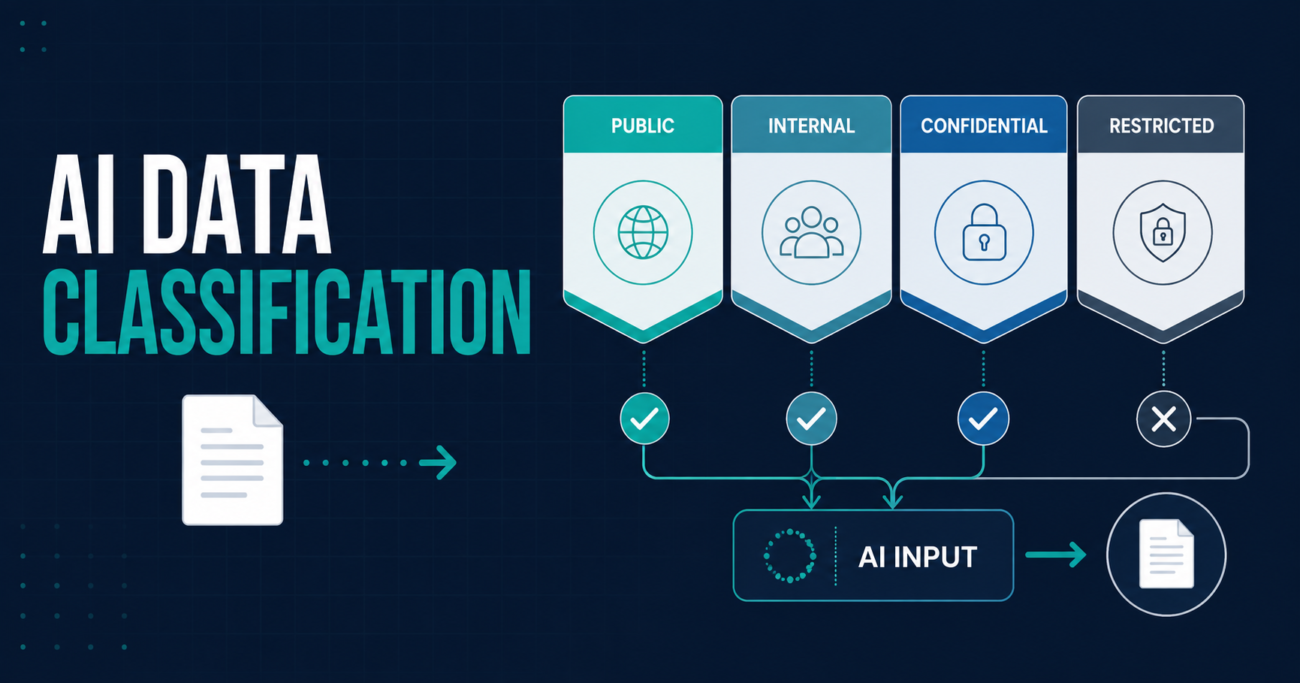
This guide provides a four-level model—Public, Internal, Confidential and Restricted—plus a tool-zone matrix, decision test and sample policy language.
Important: This is a practical planning framework, not legal, privacy, cybersecurity or records-management advice. Adapt the labels and rules to your laws, contracts, sector, existing classification scheme and risk tolerance.
Why AI Changes the Data-Handling Question
A single prompt may contain a customer name, email thread, unreleased financial information, source code or a document retrieved through a connector.
AI tools can handle organizational information through:
- prompts and file uploads;
- connectors to email, storage, CRM or knowledge bases;
- agents that retrieve or send information;
- retained prompts, outputs and logs; and
- evaluation or model improvement, depending on the product and terms.
This means the correct question is not simply, “Is this AI tool secure?” The useful questions are:
- What information is involved?
- Which AI environment will process it?
- What is the approved business purpose?
- What controls and contractual terms apply?
- What happens to the input, output, logs and connected data?
Verified Foundation
On February 12, 2026, NIST published the initial public draft of Special Publication 1800-39, Data Classification Practices. NIST says data classification helps organizations discover, identify and label sensitive unstructured data across locations such as file repositories, email and data lakes. It also positions classification as preparation for security measures and AI model training that requires labelled data. The comment period closed March 30, 2026; the publication remains an initial public draft as of August 31, 2026.
The Government of Canada’s Guide on the Use of Generative AI states that protecting personal, classified, protected and proprietary information is critical. It warns that some suppliers may inspect input or use it for further training, and that risks can arise from retention or processing outside government-controlled environments.
Canadian privacy regulators have also emphasized principles including data minimization, purpose specification, use limitation, safeguards, transparency and accountability. See the Office of the Privacy Commissioner of Canada’s statement on generative AI.
The four levels and decision rules below are an AIXYZ implementation model, not a government mandate.
Start With Three AI Tool Zones
Do not classify data without also classifying the environment that will process it. The same information may be acceptable in one approved system and prohibited in another.
| AI tool zone | Practical definition | Default data boundary |
|---|---|---|
| Public AI | Consumer or public service not approved for organizational information | Public information only |
| Approved enterprise AI | Organization-managed account with reviewed terms, identity, administration and data controls | Public and Internal; Confidential only when explicitly approved |
| Restricted AI environment | Specifically authorized environment designed for sensitive use cases, with documented controls and ownership | Only approved categories and purposes; Restricted data requires explicit authorization |
“Enterprise” is not a universal safety label. Verify the product, plan, configuration, region, retention, training terms, connector permissions and contract. A personal paid subscription is not an approved enterprise environment by default.
Before buying a platform, use the AIXYZ 15-point AI vendor evaluation checklist to examine those controls.
The Four-Level AI Data-Classification Framework
Level 1: Public
Definition: Information approved for public release or already lawfully available to the public.
Examples:
- Published website content
- Approved news releases and marketing material
- Public job descriptions
- Public legislation, policies and meeting agendas
- Product information intended for customers
- Open datasets with confirmed usage rights
Default AI rule: Public information may be used in an approved AI tool and, where organizational policy allows, in a public AI service. Copyright, licensing, accuracy and purpose still matter.
Common mistake: Assuming anything found online is free of restrictions. Publicly accessible content may still carry copyright, contractual or personal-information considerations.
Level 2: Internal
Definition: Routine non-public business information whose unauthorized disclosure would cause limited harm but is not intended for external distribution.
Examples:
- Internal process notes
- Generic project templates
- Non-sensitive training material
- Draft agendas without confidential topics
- Team procedures and internal FAQs
- De-identified operational data with low re-identification risk
Default AI rule: Use only an approved enterprise AI environment for a defined work purpose. Do not use personal accounts or public tools.
Common mistake: Treating “internal” as harmless. A collection of ordinary internal documents can reveal organizational structure, systems, clients or operating weaknesses.
Level 3: Confidential
Definition: Information whose unauthorized use or disclosure could materially harm a person, customer, employee, partner or the organization.
Examples:
- Customer records and non-public contact information
- Employee information
- Contracts, bids and pricing
- Non-public financial information
- Proprietary source code or technical architecture
- Security procedures
- Legal advice or investigation material
- Detailed project risks tied to named clients
Default AI rule: Do not enter Confidential information unless the specific use case, tool, data categories and controls have been explicitly approved. Minimize, redact or pseudonymize information where possible. Apply least-privilege connector access and human review.
Common mistake: Believing deletion of a person’s name makes a record anonymous. Other details may still identify the person or allow information to be linked back to them.
Level 4: Restricted
Definition: Highly sensitive information subject to strict legal, contractual, safety, security or organizational controls, where compromise could cause severe harm.
Examples may include:
- Credentials, access tokens and private keys
- Classified or protected government information
- Regulated health or highly sensitive identity information
- Active law-enforcement or privileged investigation records
- Payment-card authentication data
- Trade secrets central to the organization
- Detailed vulnerabilities in production systems
- Information subject to an explicit no-AI or no-third-party-processing restriction
Default AI rule: Prohibited unless a formally authorized restricted environment and use case exist. Approval should be documented by the accountable data, security, privacy and business owners. “The vendor says it is secure” is not approval.
Common mistake: Creating an exception because the task is urgent. Urgency changes priority, not classification.
Copyable AI Data-Handling Matrix
Adapt this starting point to your actual information types.
| Data class | Public AI | Approved enterprise AI | Restricted AI environment |
|---|---|---|---|
| Public | Allowed if policy permits | Allowed | Allowed |
| Internal | Not allowed | Allowed for approved work | Allowed |
| Confidential | Not allowed | Conditional, with explicit use-case approval | Conditional, within approved scope |
| Restricted | Not allowed | Not allowed by default | Explicit written authorization only |
“Conditional” should point to an approval record identifying the tool, use case, data, purpose, owner, controls and review date.
The Five-Question “Stop Before You Paste” Test
Before typing, uploading or connecting data, ask:
1. Is the AI tool approved for company work?
If no or unknown, use public information only—or stop. Do not assume a browser extension or AI feature embedded in approved software has itself been reviewed.
2. What is the highest classification present?
A document inherits the highest sensitivity of its contents. A routine meeting summary becomes Confidential if it includes employee performance, customer pricing or legal advice.
3. Can I complete the task with less data?
Remove names, account numbers, irrelevant history and attachments. Use a fictional example, a blank template, aggregated values or a short excerpt when that will accomplish the purpose.
4. Is this use case specifically allowed?
Approval for drafting marketing copy does not authorize contract analysis, hiring decisions or customer profiling. Tool approval and use-case approval are different.
5. Would I be comfortable recording exactly what I shared?
If the input would be difficult to describe in an audit, incident report or customer conversation, stop and ask the data owner or designated reviewer.
Practical Examples
| Employee wants to… | Classification concern | Safer approach |
|---|---|---|
| Rewrite a published product description | Public | Use an approved tool; verify accuracy and rights |
| Summarize internal project notes | Internal, unless sensitive details appear | Use enterprise AI; remove unrelated names and client details |
| Analyze customer complaints | Likely Confidential and may contain personal information | Obtain use-case approval; minimize fields; use controlled access and retention |
| Improve a draft proposal with pricing | Confidential | Use only an explicitly approved environment or substitute fictional values |
| Debug code containing credentials | Restricted | Remove secrets immediately; rotate exposed credentials; use approved secure development process |
| Summarize a public council agenda | Public, but output may affect public communication | Use approved sources, cite the agenda and require human verification |
| Connect an agent to a shared drive | Mixed classifications at scale | Limit it to approved folders; enforce source permissions; test for leakage |
The connector example is especially important. A user may never paste a Confidential document, yet an AI assistant can retrieve it through broad search permissions. Review connector scope with the AIXYZ AI Agent Security Checklist.
Data Minimization Is a Control, Not a Cleanup Step
Data minimization means using only what a defined purpose requires—before information enters the system.
Useful techniques include:
- Replace real names and identifiers with fictional values.
- Remove columns unrelated to the question.
- Use totals or ranges instead of individual records.
- Extract a relevant clause instead of uploading the entire contract.
- Create a synthetic sample that preserves structure without real data.
- Restrict retrieval to selected folders, document types or dates.
- Set retention and deletion according to approved requirements.
Redaction is not automatically anonymization. Test whether remaining details can identify someone when combined with other information.
Implement the Framework in 10 Business Days
Days 1–2: Map existing rules
Collect current classification, privacy, acceptable-use, records and security policies. Keep an existing formal scheme rather than inventing competing labels.
Days 3–4: Inventory AI environments
List public tools, enterprise accounts, embedded AI features, APIs, agents and connectors. The AIXYZ shadow AI audit provides a practical discovery process.
Days 5–6: Build the matrix
Map each data class to each environment. Add representative examples from HR, sales, finance, operations, technology and customer service. Assign a data owner to resolve ambiguity.
Days 7–8: Test real scenarios
Ask employees to classify 10 realistic examples. If knowledgeable people disagree, rewrite the rule or example.
Days 9–10: Publish and reinforce
Add the decision test to onboarding, the service portal and approved AI tools. Update the AIXYZ AI acceptable-use policy template with the final matrix. Provide one escalation channel and record decisions for reuse.
Sample Policy Language
Users must classify information before entering it into an AI tool or making it accessible through an AI connector. Public information may be used where organizational policy permits. Internal information may be used only in approved enterprise AI environments for authorized business purposes. Confidential information requires documented approval for the specific tool, use case and data category. Restricted information must not be used with AI unless a formally authorized environment and written exception exist. When classification is unclear, the user must stop and contact the designated data owner or support channel.
Have this language reviewed against existing policy and applicable requirements before adoption.
What to Do When Data Is Shared Incorrectly
Do not ask the employee to hide or “fix” the event alone. Record what was shared, the tool and account used, time, recipients or connectors, and actions already taken. Preserve evidence without duplicating sensitive data unnecessarily. Revoke exposed credentials immediately and follow contractual, privacy, security and records procedures.
Use the AIXYZ AI incident response plan to assess severity, contain the exposure and assign owners. A non-punitive reporting culture improves detection; silence expands impact.
Common Failure Modes
- One rule for every AI product: product plans, controls and data uses differ.
- Classification without tool zones: employees know data is Confidential but not where it may be processed.
- Labels without examples: abstract definitions fail under time pressure.
- Assuming paid means approved: payment does not replace security and privacy review.
- Ignoring connectors: automated retrieval can expose more than manual prompts.
- Classifying only inputs: outputs, logs, embeddings and generated files also require handling rules.
- Permanent approval: material changes to models, connectors, terms or use cases require reassessment.
AIXYZ Analysis
For most small organizations, four levels are enough. A more complex scheme may look mature but often produces inconsistent decisions. The framework succeeds when an employee can classify a real document quickly, identify the permitted environment and know where to ask for help.
The hard boundary should be explicit: tool approval does not equal data approval. The organization must approve the combination of tool, data, use case and controls.
Frequently Asked Questions
Can employees use public information in any AI tool?
Not automatically. The organization may restrict tools for licensing, security, records, quality or procurement reasons. Public information also may carry copyright or usage restrictions.
Is an enterprise AI account safe for Confidential data?
Only when the organization has reviewed and approved the specific product, plan, configuration, terms, purpose and data category. “Enterprise” alone is not enough evidence.
Is de-identified data always safe to use?
No. Re-identification may be possible from remaining details or linked data. Consider sensitivity, uniqueness, context and available safeguards.
Who decides when classification is unclear?
Assign named data owners or a cross-functional escalation channel. Employees should not be forced to make high-risk interpretations alone.
How often should the matrix be reviewed?
Review it periodically and whenever a tool, plan, model, connector, use case, contract, policy or applicable requirement materially changes.
Does data classification replace access control?
No. Classification informs controls. Identity, least privilege, encryption, retention, monitoring, approval and incident response still matter.
Start With One Real Workflow
Choose a workflow where employees already want AI help—such as meeting summaries, proposal drafting or customer-service knowledge search. Identify the information involved, apply the four levels, map the permitted environment and test 10 examples with actual users.
If the team cannot agree on what may enter the system, the use case is not ready to scale.