Your company may have more AI tools than it has approved.
An employee uses a free chatbot to rewrite a customer email. A project manager uploads meeting notes to create a summary. A salesperson installs an AI browser extension. A developer sends a code fragment to an assistant. Another team activates an AI feature already embedded in software the business owns.
Together, these create shadow AI: AI tools, accounts, features or integrations used for work outside the organization’s approval and risk-management processes.
The wrong response is to pretend this usage does not exist—or to issue a blanket ban without offering an approved alternative. A better response is a short, non-punitive audit that identifies current use, classifies risk and turns useful experimentation into governed adoption.
This guide provides a practical shadow AI audit for small and mid-sized businesses, project teams and public-sector organizations.
Important: This article offers operational guidance, not legal or compliance advice. Privacy, employment, records, security, contractual and sector-specific requirements should be reviewed by qualified professionals.
What Is Shadow AI?
Shadow AI is a practical extension of the established “shadow IT” concept. The UK National Cyber Security Centre defines shadow IT as technology used for organizational work but not accounted for in asset and risk-management processes or integrated with corporate IT processes.
Shadow AI can include:
- Public generative AI accounts used for company work
- AI browser extensions installed without review
- Meeting transcription or note-taking tools
- AI features activated inside approved software without separate assessment
- Personal automation accounts connected to company email or storage
- Custom chatbots, agents or API scripts built by employees
- AI tools purchased on an employee credit card
- Unsanctioned connectors to a CRM, cloud drive, help desk or database
- Model outputs used in decisions without disclosure or human review
The organization may not know what data is processed, what the tool can access, what terms apply or who is accountable for the output.
Why Shadow AI Creates Business Risk
Data can leave approved boundaries
Employees may enter customer records, internal documents, source code, contracts or personal information without understanding retention, provider use or deletion terms.
The Government of Canada advises federal institutions to use generative AI only where risks can be effectively managed. Although directed to federal institutions, its underlying control is broadly useful: understand the information and use case first.
Connected tools can expand the impact
A standalone chatbot receives what a user submits. A connected AI tool may also retrieve files, read email, access customer records or initiate actions. This means an unreviewed connector can create both confidentiality and operational risk.
For a technical example of how connected AI can call tools and data sources, see How to Add an MCP Server to ChatGPT. In a business setting, every connector should have a defined owner, approved access scope and monitoring plan.
Output may enter business processes without verification
AI-generated facts, citations, calculations or recommendations can appear confident while being incomplete or wrong. When teams use those outputs in proposals, customer communications or decisions, the business remains accountable.
Costs and vendors become fragmented
Teams may buy overlapping tools and create unsupported workflows, weakening purchasing leverage and increasing lock-in.
A ban can hide the problem
If disclosure means punishment or an automatic ban, employees have an incentive to stay quiet. Focus first on understanding use and reducing risk.
Verified Guidance vs. AIXYZ’s Practical Method
This AIXYZ audit method is informed by, but is not a certification against, the following guidance:
- The NIST AI Risk Management Framework is voluntary and organizes AI risk work around Govern, Map, Measure and Manage.
- The NIST AI RMF Playbook provides suggested actions aligned with those functions and explicitly notes that it is not a checklist that must be followed in full.
- NIST’s Map guidance emphasizes documenting business purpose, system context, human oversight, known limitations and relevant risks.
- The Office of the Privacy Commissioner of Canada recommends privacy by design and limiting the sharing of personal, sensitive or confidential information.
- The NCSC’s asset-management guidance explains why unaccounted technology creates unknown risk and recommends maintaining inventories to support security and risk management.
The practical objective is simple: you cannot govern AI use that you have not identified.
The Seven-Day Shadow AI Audit
Day 1: Define the Scope and Owner
Assign one person to coordinate the audit. This may be an IT, security, privacy, operations, project or business leader depending on organizational size.
Define:
- Employees, contractors or specific departments included
- Standalone tools, embedded features, browser extensions and custom integrations
- Company-owned and personal accounts used for business work
- Information types and systems involved
- Review period, such as current use and the previous 90 days
Unless there is evidence of misconduct or an incident, position the audit as governance and enablement—not a forensic investigation.
Day 2: Send a Short, Non-Punitive Survey
Ask employees to report:
- Which AI tools or features do you use for work?
- Which account type do you use: personal, free, business or company-managed?
- What tasks do you perform?
- What information do you enter, upload or connect?
- Does the tool access email, files, CRM, code repositories or other systems?
- Do you use the output internally, externally or for a decision?
- What benefit does it provide?
- What concerns or failures have you noticed?
Do not ask only about one chatbot; that misses embedded features, local models, transcription tools, automations and browser extensions.
Consider an amnesty statement for ordinary experimentation so employees can move to an approved process. Have HR or legal review the wording where necessary.
Day 3: Review Accounts, Expenses and Integrations
Use proportionate, authorized evidence sources to supplement the survey:
- Expense reports and corporate card transactions
- SaaS or application inventories
- Single sign-on and identity-provider records
- Browser extension inventories on managed devices
- Cloud application and security logs
- Email or storage integrations visible to administrators
- API keys and service accounts in approved development environments
- Existing vendor contracts
Respect employee-monitoring authority and privacy requirements. The objective is an accurate inventory, not indiscriminate surveillance.
Day 4: Build the AI Inventory
Create one row per distinct combination of tool, account, use case and data type. The same platform may have a low-risk public-content use and a high-risk customer-data use.
| Inventory field | Example |
|---|---|
| Tool and feature | AI meeting summary feature |
| Account/plan | Personal free account |
| Business owner | Sales Operations Manager |
| Users | Four account executives |
| Purpose | Draft follow-up notes |
| Input data | Meeting transcript and contact details |
| Connected systems | Calendar and video meeting platform |
| Output destination | CRM activity record |
| Human review | Salesperson reviews before saving |
| External impact | Indirect—CRM record may guide follow-up |
| Contract/terms reviewed | No |
| Current status | Unreviewed |
| Next action | Privacy and vendor review |
Describe actual use—not just product names.
Day 5: Classify Each Use Case
Use a simple risk tier:
| Tier | Typical characteristics | Example | Default response |
|---|---|---|---|
| Low | Public or synthetic data; internal draft; human review; no connector | Brainstorming public campaign titles | Approve with basic rules |
| Moderate | Internal information; repeated workflow; limited integration; external output after review | Drafting customer responses from approved knowledge | Approve with controls or pilot |
| High | Personal/confidential data; broad connector access; automated action; material decision | AI screening applicants or changing customer records | Pause pending specialist review |
| Prohibited | Credentials, unlawful use, deceptive impersonation or deliberate policy bypass | Uploading passwords or creating fraudulent content | Stop and follow incident process |
Consider at least six dimensions:
- Sensitivity of the input data
- People or systems affected
- Whether the output leaves the organization
- Whether a qualified person reviews it
- Access provided through integrations
- Consequence if the output or action is wrong
Do not classify an entire vendor. Risk depends on the use case, account, configuration, data and impact.
Day 6: Decide—Approve, Restrict, Replace or Stop
Give each inventory entry one status:
- Approved: The use is permitted under documented conditions.
- Restricted: Permitted only for defined users, data or tasks.
- Pilot: Requires a limited test before wider use.
- Replace: Move users to an approved alternative with stronger controls.
- Stop: Use must cease because risk cannot currently be managed.
Before approving a product, apply the 15-point AI vendor evaluation checklist. Use the 30-day AI pilot plan for moderate-risk workflows.
Document conditions such as:
- Approved account and subscription level
- Allowed and prohibited information
- Permitted features and connectors
- Required human approval
- Retention and deletion settings
- Named business and technical owners
- Training requirements
- Review or renewal date
Day 7: Communicate and Create an Approved-Tool Register
Publish a simple register employees can find:
| Tool/feature | Approved uses | Prohibited data/actions | Owner | Review date |
|---|---|---|---|---|
| [Tool] | [Specific tasks] | [Restrictions] | [Role] | [Date] |
Pair it with an understandable policy. A rule that says “use AI responsibly” is not enough. Employees need examples and a route to request approval. Use the AI Acceptable Use Policy Template as a starting point.
Tell employees:
- Which tools are approved now
- Which previous uses must stop or change
- How to protect data
- What requires human review
- How to propose a new tool or use case
- Where to report a mistake or incident
What to Do When the Audit Finds a Problem
Sensitive information entered into an unapproved tool
Stop the use, preserve relevant facts and follow the organization’s incident-response process. Determine the information involved, account type, provider terms, retention, sharing, affected people and contractual or reporting obligations. Avoid promising deletion until it is confirmed.
A valuable workflow uses the wrong account
Do not destroy a useful process automatically. Evaluate whether a managed business plan, approved configuration or safer alternative can preserve the benefit while adding appropriate controls.
An employee-built agent can take action
Pause its write capabilities until permissions, test cases, logs, approval steps, failure handling and ownership are reviewed. An agent that sends messages or changes records creates more risk than a drafting assistant.
Several teams bought overlapping tools
Compare business fit, security controls, total cost and export options. Consolidate only when one option meets the different use cases; forced standardization on an unsuitable tool will recreate shadow usage.
Keep the Inventory Current
A one-time audit becomes stale quickly. Monitor through:
- Quarterly employee confirmation of tools and use cases
- Review of new SaaS expenses and integrations
- Approval workflow for new AI features and connectors
- Register review when vendor terms or configurations change
- Annual or risk-based reassessment
- Incident and near-miss tracking
- Clear offboarding and access-removal procedures
Track meaningful measures:
- Percentage of identified uses with a named owner
- Percentage classified and decided
- Time required to review a new request
- Number of duplicate subscriptions removed
- Number and severity of AI-related incidents
- Adoption of approved alternatives
Blocked websites are not the main success metric. The goal is governed, valuable use.
Frequently Asked Questions
Is shadow AI always malicious?
No. It often begins when employees seek productivity and approved options are unclear. Intent does not eliminate risk, but it should shape the response.
Should we block all public AI tools?
Blocking may suit specific environments, but it does not replace policy, training, approved alternatives and monitoring. AI may also be embedded in existing tools.
Who should own the AI inventory?
Assign one accountable owner and involve IT, security, privacy, legal, procurement and process owners in proportion to risk.
How often should we repeat the audit?
Quarterly is a practical starting point during rapid adoption. Also trigger a review after a material incident, new enterprise AI purchase, major connector deployment or significant change in vendor terms.
Can we approve a tool without approving every use?
Yes—and usually should. Approval should specify the account, users, data, features and tasks. A tool approved for public-content drafting may remain prohibited for employee or customer records.
Final Takeaway
Shadow AI is not solved by publishing a policy and assuming everyone follows it. Businesses need visibility into actual tools, accounts, data and workflows.
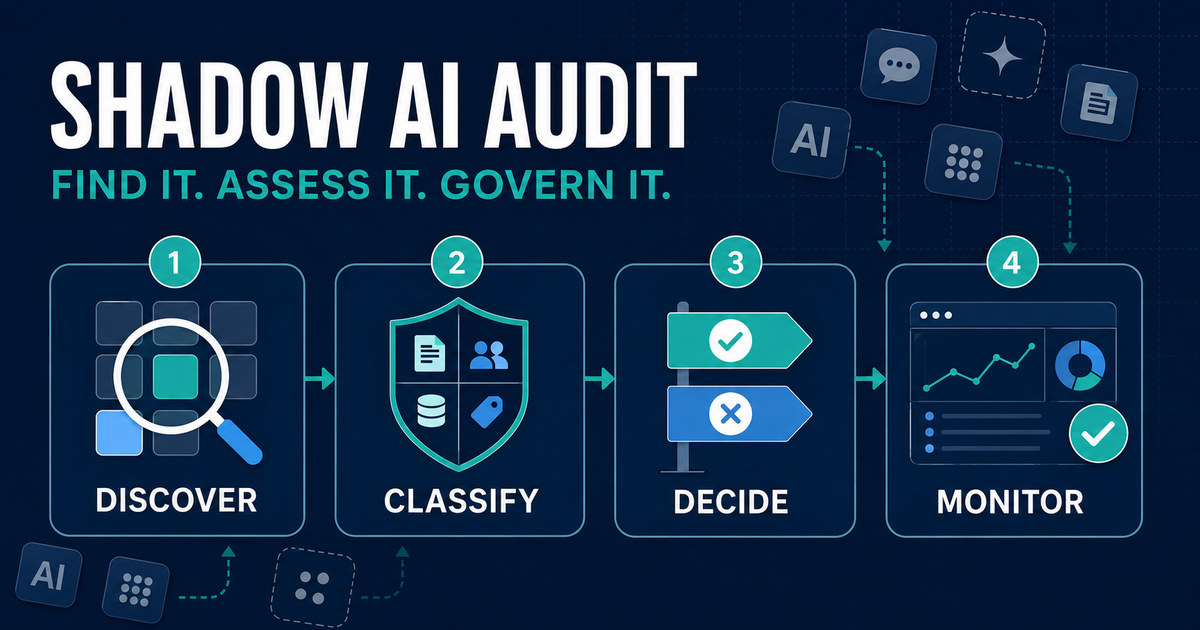
Use four steps:
- Discover what employees use and why.
- Classify each use by data, access, oversight and impact.
- Decide whether to approve, restrict, pilot, replace or stop it.
- Monitor the inventory, vendor changes and incidents.
The audit may reveal risky behaviour, but it may also uncover valuable employee-led innovation. The objective is to separate the two—and give useful AI adoption a safe path forward.
Call to Action
Start this week: send the eight-question survey, create the inventory table and review the first five reported use cases. Then publish an approved-tool register employees can actually use.
Authoritative Sources
- NIST AI Risk Management Framework
- NIST AI RMF Playbook
- NIST AI RMF Generative AI Profile
- Government of Canada: Guide on the Use of Generative Artificial Intelligence
- Office of the Privacy Commissioner of Canada: AI, Privacy and Your Business
- UK National Cyber Security Centre: Asset Management and Shadow IT